Stop Wasting Your Conference Room! Maximize Space with Flexible Training Room Furniture
A conference room that sits empty between meetings is an expensive asset being underused. The right training room furniture — tables that fold, connect, and reconfigure in minutes — turns a single space into a classroom, workshop, or presentation venue on demand. This guide covers what to specify and why it matters.
Space Is Money — And Fixed Furniture Wastes Both
Traditional fixed conference tables serve one function well and everything else poorly. When a meeting ends, the room sits idle. When a training session is needed, the furniture doesn't accommodate it. For organizations where floor space carries a real cost — corporate headquarters, hotel event floors, government training centers — a room that can only be used for one purpose is a liability, not an asset.
The solution is not a larger room. It is furniture that works as hard as the space it occupies. Flexible training tables for conference rooms — paired with the right seating — allow a single room to function as a lecture hall in the morning, a workshop in the afternoon, and a presentation space in the evening, without a facilities team and without significant downtime between transitions.
One Room, Three Layouts — Ready in Under Ten Minutes
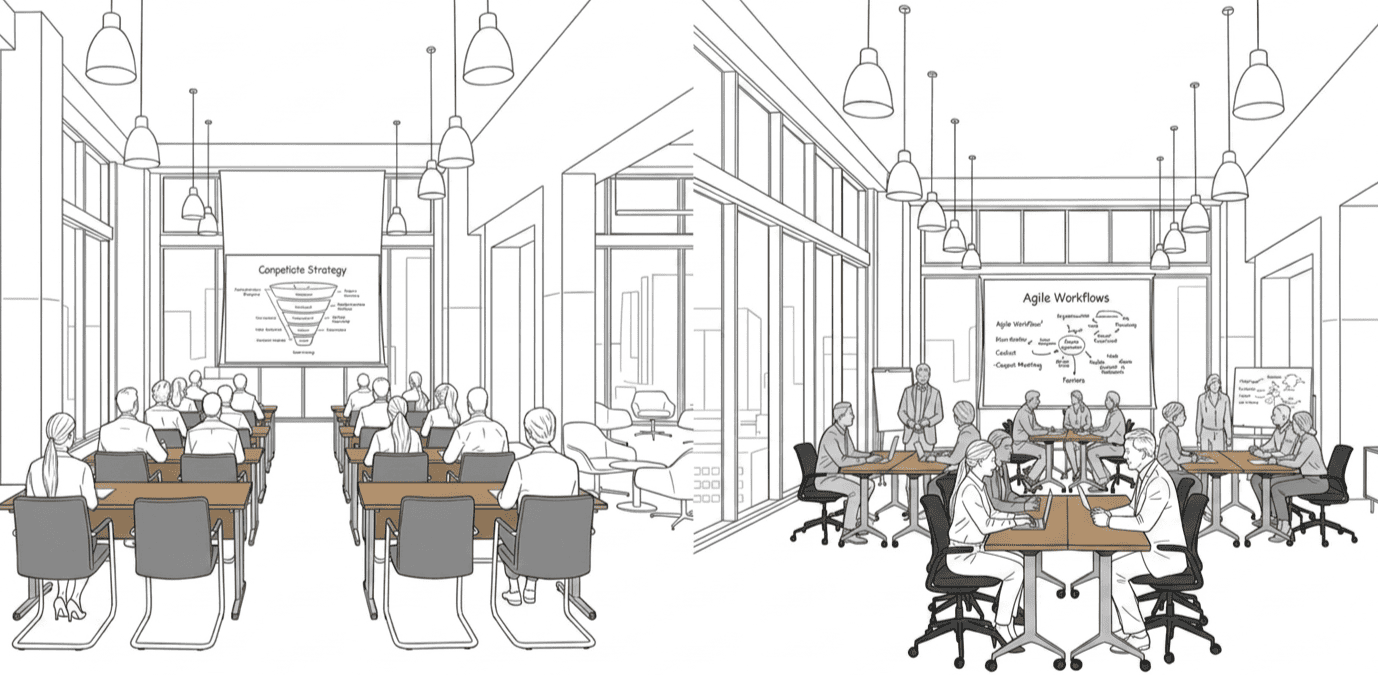
The value of flexible training room furniture is only realized if the furniture can actually support multiple configurations without requiring significant effort to transition between them. Three layouts cover the majority of training and meeting use cases:
Classroom Style
Rows of tables facing a presentation wall. Best suited for technical training, onboarding sessions, and any scenario where information flows primarily from presenter to audience. Requires tables that align cleanly and connect securely — ganging connectors prevent gaps and keep rows straight without manual adjustment between each use.
U-Shape
Tables arranged in an open rectangle, with participants facing inward. Suited for senior team meetings, interactive workshops, and sessions requiring discussion across the group. Requires tables with sufficient width to allow comfortable seating on both sides, and a configuration flexible enough to close or open the U depending on group size.
Group Pods
Small clusters of tables pushed together to form group workstations. Best for project workshops, brainstorming sessions, and breakout activities within a larger training program. Requires lightweight tables that can be moved and repositioned quickly by a single person — locking castors are essential to prevent pod drift once configuration is set.
Still Not Sure Whether to Buy Tables or Tablet Arm Chairs?
The choice between a conference training table and a chair-mounted tablet arm comes down to three variables: session length, space availability, and the primary activity taking place in the room. Neither option is universally better — the right answer depends on how the space is actually used.
Training tables are the stronger choice when sessions run longer than two hours, when users need to operate laptops or spread out reference materials, or when the room needs to flex between different configurations. They also suit environments where appearance matters — corporate training centers and hotel event spaces where furniture contributes to the overall impression.
Chairs with tablet arms are more appropriate when space is the primary constraint, when sessions are shorter and writing-light, or when the room needs to accommodate varying headcounts quickly. A room furnished with stackable training chairs with tablet arms can be reconfigured in minutes and stores more seats in the same footprint than a full table-and-chair setup.
| Training Table | Chair with Tablet Arm | |
| Session length | 2+ hours | Under 2 hours |
| Primary activity | Laptop use, group work | Listening, note-taking |
| Space requirement | Higher | Lower |
| Reconfiguration speed | Slower | Fast |
| Storage | Fold & stack against wall | Stack vertically |
| Best for | Corporate, hotel, IT training | Briefings, community events |
The Hardware That Makes Reconfiguration Actually Fast
Flexibility on paper only counts if the hardware supports it in practice. The following product features determine whether a training room reconfigures in five minutes or forty-five.
Training Table
Available in lengths from 70cm to 180cm, with widths of 45–50cm (single-sided) and 60–70cm (double-sided). The flip-top mechanism allows the tabletop to fold vertically, reducing the table's footprint significantly when stored against a wall. Ganging connectors allow multiple tables to link securely side-by-side, maintaining alignment across classroom or U-shape configurations without gaps. Lockable castors allow a single person to move, position, and secure each table without assistance.
Common sourcing mistake: Specifying tables without confirming ganging connector compatibility across the product range. If tables from different batches use different connector specs, rows won't align — a problem that only appears after delivery.
Stackable Training Chair
The standard stackable training chair features a smart linking system that connects chairs side-by-side for clean row alignment, anti-slip quiet castors with lift-and-brake function, and a PP backrest with a 98° recline angle for comfortable upright seating. A V-shape ventilated back reduces heat buildup during longer sessions. Passes BIFMA standard. Available in six shell colors (Black, Orange, Blue, Green, Red, Grey) with Black or Grey base options.
Training Chair with Tablet Arm
The tablet-arm variant adds a 360° rotating writing surface with anti-collision protection, supported by a 110° rotation support bar and a 50° tablet panel rotation — universal for both left and right-handed users. A pallet beneath the seat provides storage for bags or personal items during sessions. The linking and stacking system is consistent with the standard chair, allowing both variants to be stored together.
See the Difference: Flexible Furniture in Real Training Environments
Scenario A: Corporate Training Center
A corporate facility running weekly onboarding sessions in the morning and department workshops in the afternoon needs furniture that transitions between configurations without facilities staff involvement. Flip-top tables with ganging connectors handle the classroom-to-U-shape transition; stackable chairs with linking systems maintain row alignment without manual adjustment. The result is a room that resets in under ten minutes between sessions.
Scenario B: Call Center Training Room
Call centers onboarding large cohorts of new staff need training rooms that expand quickly to accommodate varying group sizes. Stackable training chairs with tablet arms allow the room to seat significantly more people than a table-based setup in the same footprint — useful when a single training room needs to handle both small team sessions and full cohort orientations. For a full breakdown of call center seating requirements, see our call center office chairs guide →
Find Your Spec in 30 Seconds: Corporate, Education, Hotel & Government
Different environments prioritize different aspects of training room furniture. Use this table as a starting point for your specification:
| Environment | Table priority | Chair priority | Tablet arm |
| Corporate | Ganging + flip-top | Linking system, color options | Optional |
| Education | Durability, size range | BIFMA certified, stackable | Recommended |
| Hotel & Events | Appearance, flip-top storage | Stackable, color options | Less common |
| Government | Certification, durability | BIFMA certified, linking | Optional |
FAQ
What size training table is best for a conference room?
For most conference-to-training configurations, 120cm or 140cm tables offer the best balance between individual workspace and room capacity. Narrower 45–50cm tables work well for single-sided classroom layouts; wider 60–70cm tables are better for U-shape or group pod arrangements where users sit on both sides.
How long does it take to reconfigure a training room?
With flip-top tables on locking castors and stackable chairs with linking systems, a single person can reconfigure a 20-person room between classroom and U-shape layouts in under ten minutes. Without these features — fixed tables or chairs without castors — the same task typically requires multiple people and 30–45 minutes.
What is a ganging connector and do I need one?
A ganging connector is a mechanical fastener that links two tables side-by-side, preventing gaps and keeping rows aligned without manual adjustment. If you're configuring classroom-style rows or U-shapes with multiple tables, ganging connectors are essential — without them, tables drift apart during use and rows require constant realignment.
What is the difference between a training chair and a conference chair?
Training chairs are designed for reconfigurability — they stack, link, and move easily. Conference chairs are designed for fixed placement around a permanent table, typically with more padding and a more formal appearance. For rooms that need to serve both functions, stackable training chairs with linking systems offer a practical compromise without requiring two separate inventories.
Training table or tablet arm chair — which is better for my space?
If sessions run longer than two hours and users need table space for laptops or materials, specify training tables. If space is the primary constraint or sessions are short and writing-light, tablet arm chairs are more efficient. For rooms that host both types of sessions, a combination of both — tables for longer programs, tablet-arm chairs for briefings and overflow — provides the most flexibility.
